Instant launchOpen it from an icon without typing the address each time.
How to install the GradeBook app
The gradebook can be installed on your phone or computer like a regular app. Below are the steps for your device.
NotificationsGet alerts for grades, absences and approvals right on your device.
Full screenNo browser bar, more room for the gradebook.
Fast startThe app loads quickly even on weak connections.
Installing on Windows
Works in Microsoft Edge and Google Chrome. The app appears in the Start menu like any program.
- 1Open catalogul.online in Edge or ChromeWait for the page to load completely.
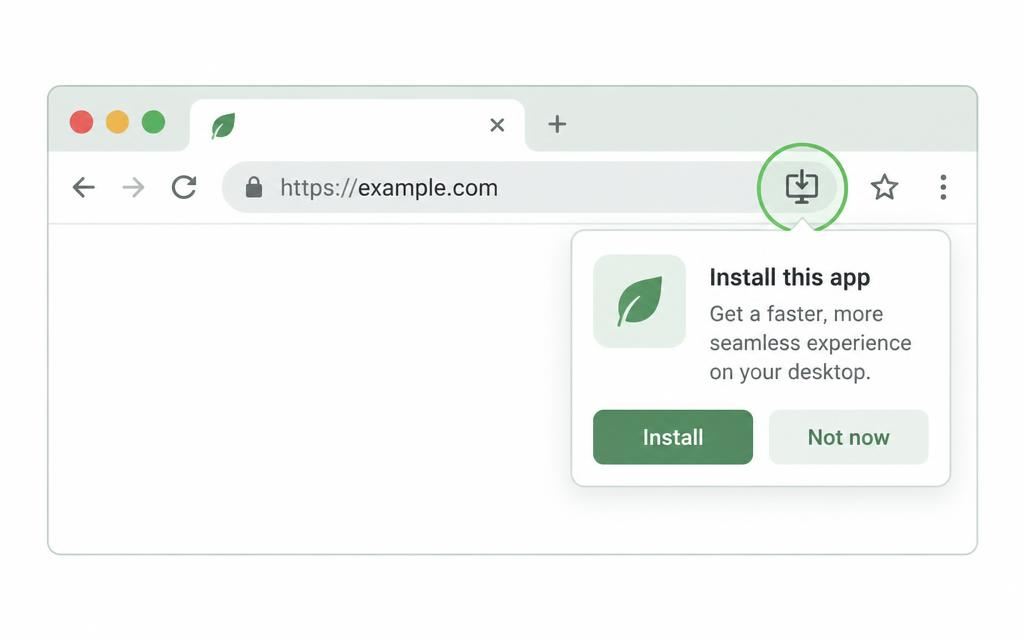
- 2Look for the install iconOn the right of the address bar there's a monitor with a down arrow. Click it.
- 3Alternatively, use the menuThree-dot menu → “Apps” → “Install this site as an app”.
- 4Confirm with “Install”The app opens in its own window, without the browser bar.
- 5Pin it to the taskbarRight-click the icon in the taskbar → “Pin to taskbar”.
Frequently asked questions
Installed the app? Go straight to your account.
Sign in